
An escape room is a show that runs ten times a day without a technician. The sound, the screens, the lights and the props have to react to what the players do, and to the game master when the players get stuck. Many rooms run on a PC with a tangle of scripts that only the person who built them understands. Rocket Show replaces that with one small box that starts by itself, takes signals from sensors, buttons and your game software, and plays sound, video, DMX lighting and switched outputs as cues.
In short: every effect in the room is a cue (a composition) holding its sound, video, lighting and actions. Sensors and buttons on the digital inputs, MIDI, HTTP requests or the game master's tablet start the cues. Outputs switch relays for locks and props at set moments. The room's ambience plays by default and loops.
Sensors and buttons start the cues
Wire a reed switch, a pressure mat, a button or the output of a puzzle controller to a digital input. Under Settings → External control, each input gets a list of actions that fire when it is activated:
- play a cue by name, such as the clue video when the safe opens;
- play a cue as a sample: a sound effect on top of whatever runs, without stopping the ambience (up to 20 at once);
- stop, pause, or move to the next cue in the game;
- set the lights, switch an output, send MIDI or call an HTTP address.
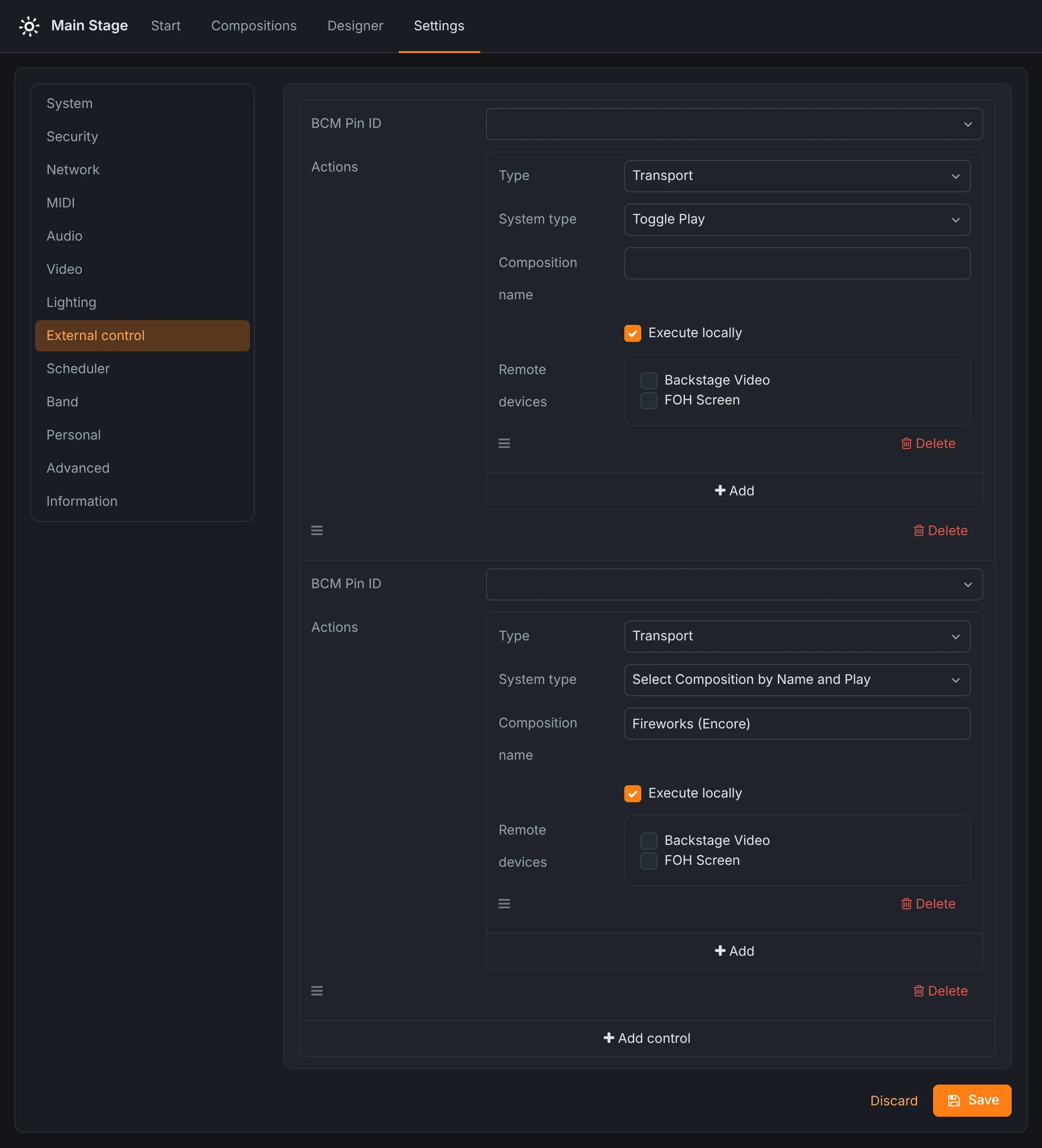
The wiring depends on the device. SPARK has two inputs and four outputs on terminal blocks; an input is activated when its left pin is driven to 3.3 V against ground, at up to 8 mA. On the Community Edition, any free GPIO pin of the Raspberry Pi is an input, activated by connecting it to ground, so a plain switch between the pin and a ground pin is enough. More inputs than that come from your puzzle controllers over HTTP or MIDI.
Outputs open locks and run props
A cue can switch a digital output on or off at a set moment: open the hidden door when the final video ends, start the fog machine with the thunder, light the signal lamp. The outputs give 3.3 V, a logic signal: connect them to a relay module or a lock controller, which switches the actual load. Because the action sits on the cue's timeline, the door opens on exactly the right frame of the video, every game.
Ambience, sound effects and clues
- The ambience is the default composition: it starts when the device starts and whenever nothing else plays, and loops for as long as it has to.
- Sound effects play as samples on top of it, so a creaking door does not cut the background music.
- Clue videos play full screen on the HDMI output, together with the sound and light of their cue. See video playback.
- Light follows the game: a scene per phase of the room, designed in the lighting designer, or DMX channels set by a lighting action. A cue can turn the room red for the final five minutes.
The game master's tablet
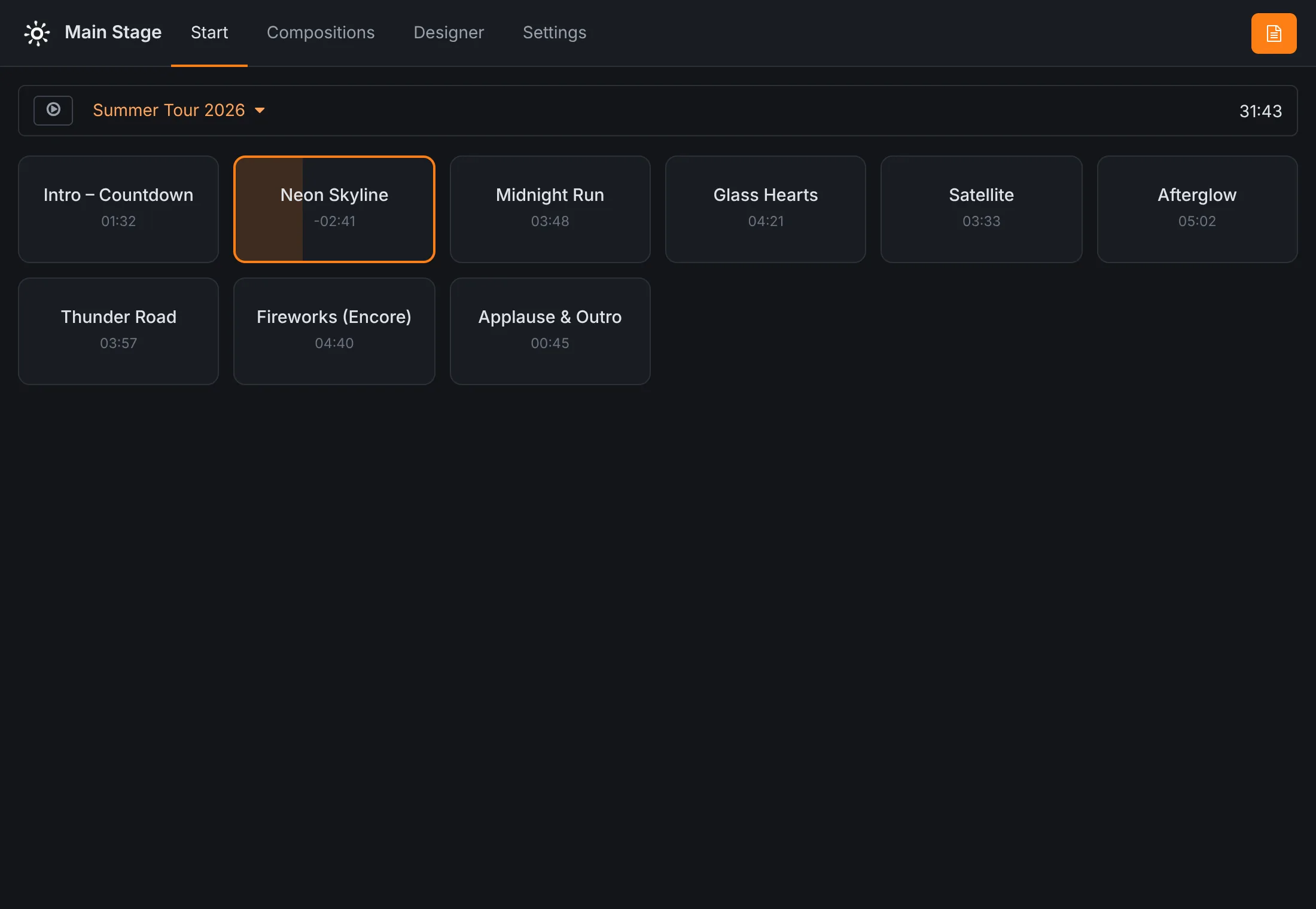
The game master runs the room from the browser of a tablet or a phone, in the booth or in the corridor. The cue grid shows every cue as a large button: tap it to start it, tap it again to stop it. The playing cue fills up as it runs and shows how long it has left. Several tablets can be connected at once, and they all show the same state.
Working with your game software
If the room already has a controller or an escape room management system, Rocket Show plugs into it in both directions:
- In: your software starts cues with HTTP requests, authenticated by an API key created on the device. To play the sound effect Door creak on top of the ambience:
curl -X POST -H "X-API-Key: <your key>" \
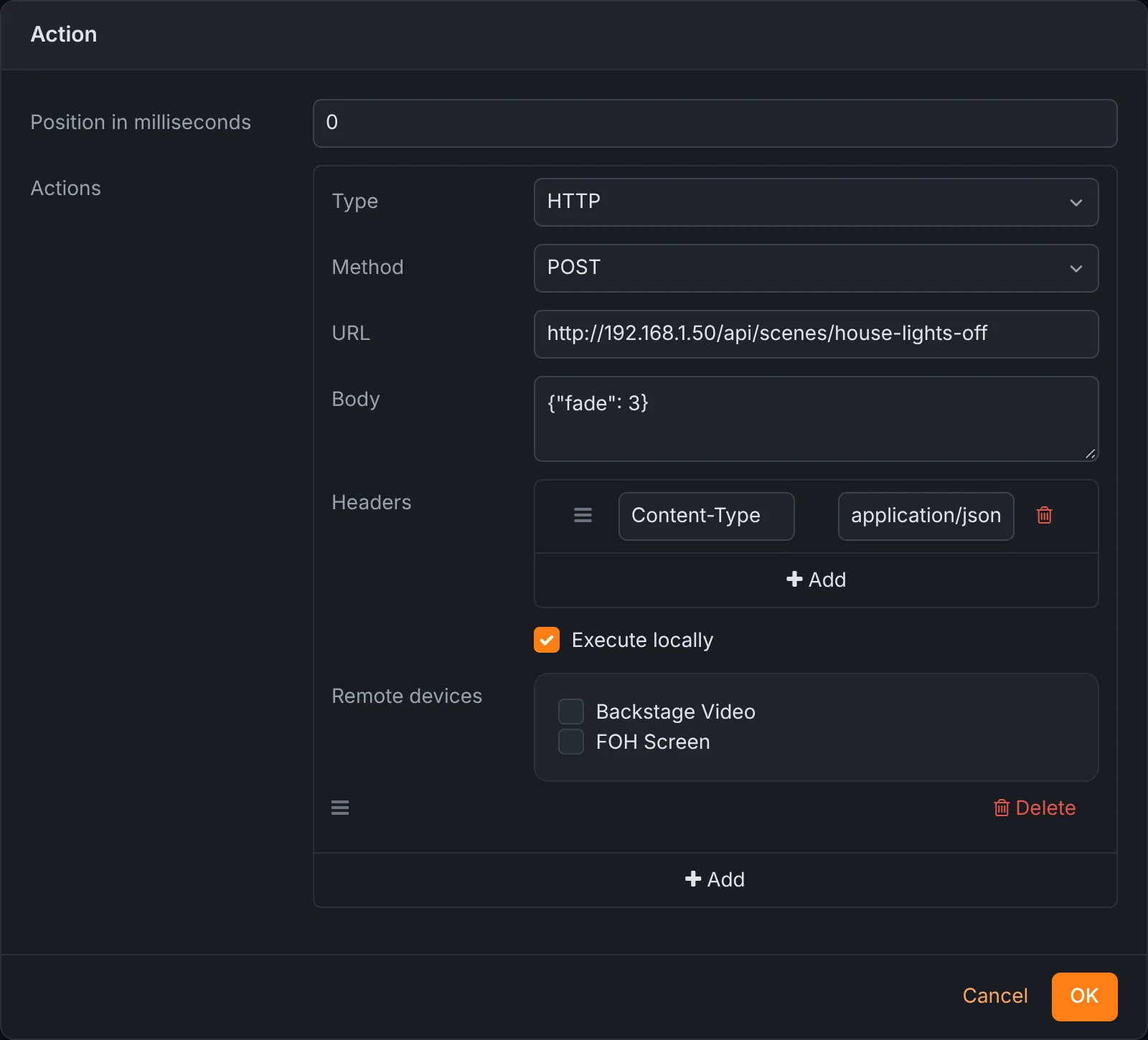
"http://rocketshow.local/api/transport/play-as-sample?name=Door%20creak"- Out: an HTTP action calls any address with GET, POST or another method, with a body and headers, at a moment in a cue or when an input fires. Use it to tell your game software that the final video has ended, or to switch a smart plug.
The full list of requests is in the documentation.
Several rooms
Give each room its own unit, so a fault in one room never stops another. If a central booth should start things in several rooms at once, one unit can control the others over the network: actions and controls can run on chosen remote units. The units exchange commands rather than share a clock, so whatever has to be frame-accurate together stays on one unit.
Built to run all day
There is no PC to boot, no screen saver and no update popping up during a game. The device starts its ambience when it is switched on in the morning. SPARK installs updates next to the running system and switches over only when they are complete, and a backup of the whole room fits in one file, ready to restore on a spare unit.
Questions
- Can a sensor or a button start a sound or a video?
- Yes. Each digital input fires a list of actions when it is activated: play a cue by name, play a sound effect on top of the ambience, stop, switch the lights, call an HTTP address. It fires once each time the input becomes active.
- Can it open a maglock or switch a relay?
- Through a relay module, yes. The digital outputs give 3.3 V at up to 8 mA, enough to drive the input of a relay or a lock controller, not the lock itself. A composition switches an output at a set moment, for example at the end of a clue video.
- Can our escape room software trigger it?
- Yes, over HTTP. With an API key, your software can select a cue by name and play it, play a cue as a sound effect on top of what runs, pause or stop, and Rocket Show's own HTTP actions can call your software in return. MIDI works too.
- How do we reset the room between groups?
- Make a reset cue: a composition whose actions set the lights to the starting look, switch the outputs off and start the waiting ambience. Fire it from the game master's tablet, a hidden button or your game software.