Rocket Show SPARK · For escape rooms, attractions, museums & installations

Sensors in. Lights, sound, video & props out —
the installation runs itself.

Someone steps closer, presses a button, solves a puzzle — SPARK reacts and fires audio, video, lighting and props in perfect sync. Wire it once, and it keeps doing it for every visitor, every day, for years.

30-day money-back guarantee — no questions asked

  • 1,000+ users
  • 15 countries
  • No subscription required
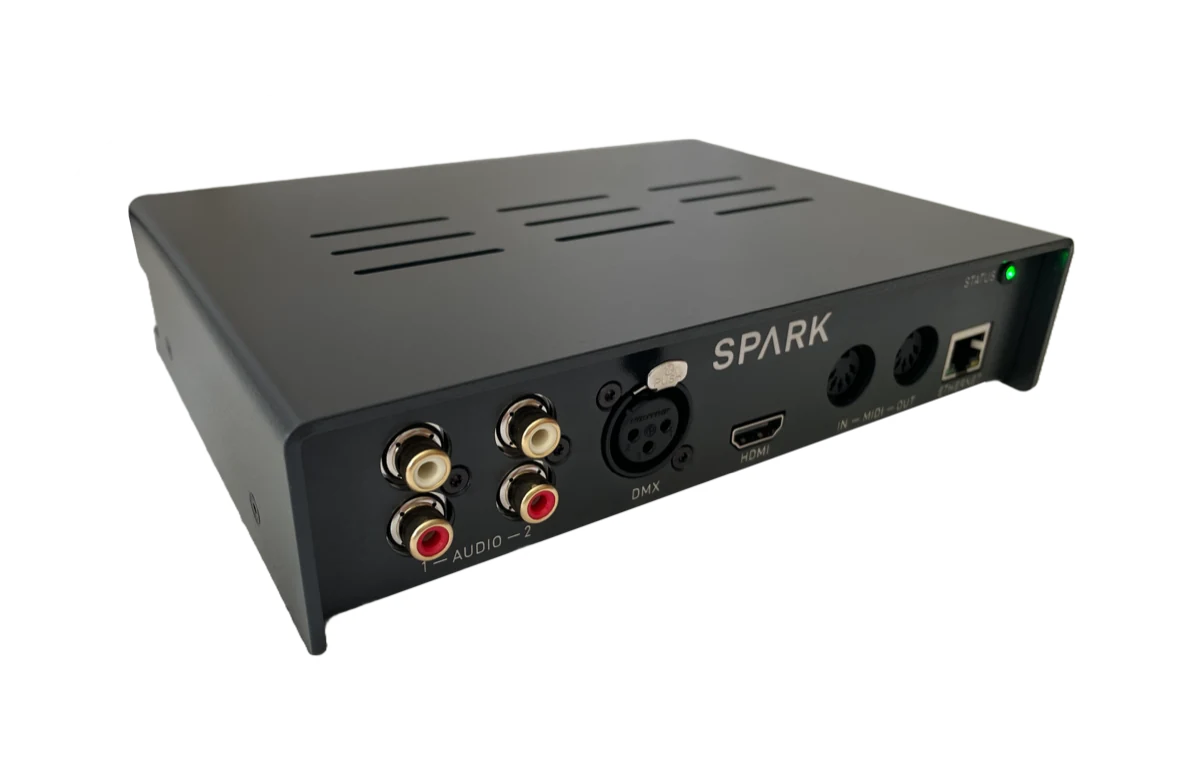
Rocket Show SPARK hardware unit
Discover more
Why SPARK

Built for installations that run without you.

Purpose-built hardware that does one job flawlessly — so the doors open on time whether or not anyone technical is on shift.

Wire it once, then forget it

Set a default show and it starts on its own the moment the unit gets power — after a night off, after a power cut, after someone unplugged the wrong thing. No PC in the cupboard, no login, no screen.

Reacts to what visitors do

Two digital inputs read buttons, reed switches and contact closures from the control system you already have. MIDI, the network and the app can start a scene just as well.

Fires everything at once

Four digital outputs plus DMX, HDMI, audio and MIDI — the light change, the sound, the video and the prop all land on the same frame.

Product video

Watch SPARK run a whole show.

Two minutes: lights, video, audio and MIDI firing together from a single unit — with no laptop anywhere in the rig.

Nothing loads from YouTube until you press play.

How it works

Three steps to a space that plays itself.

01

Build the scene

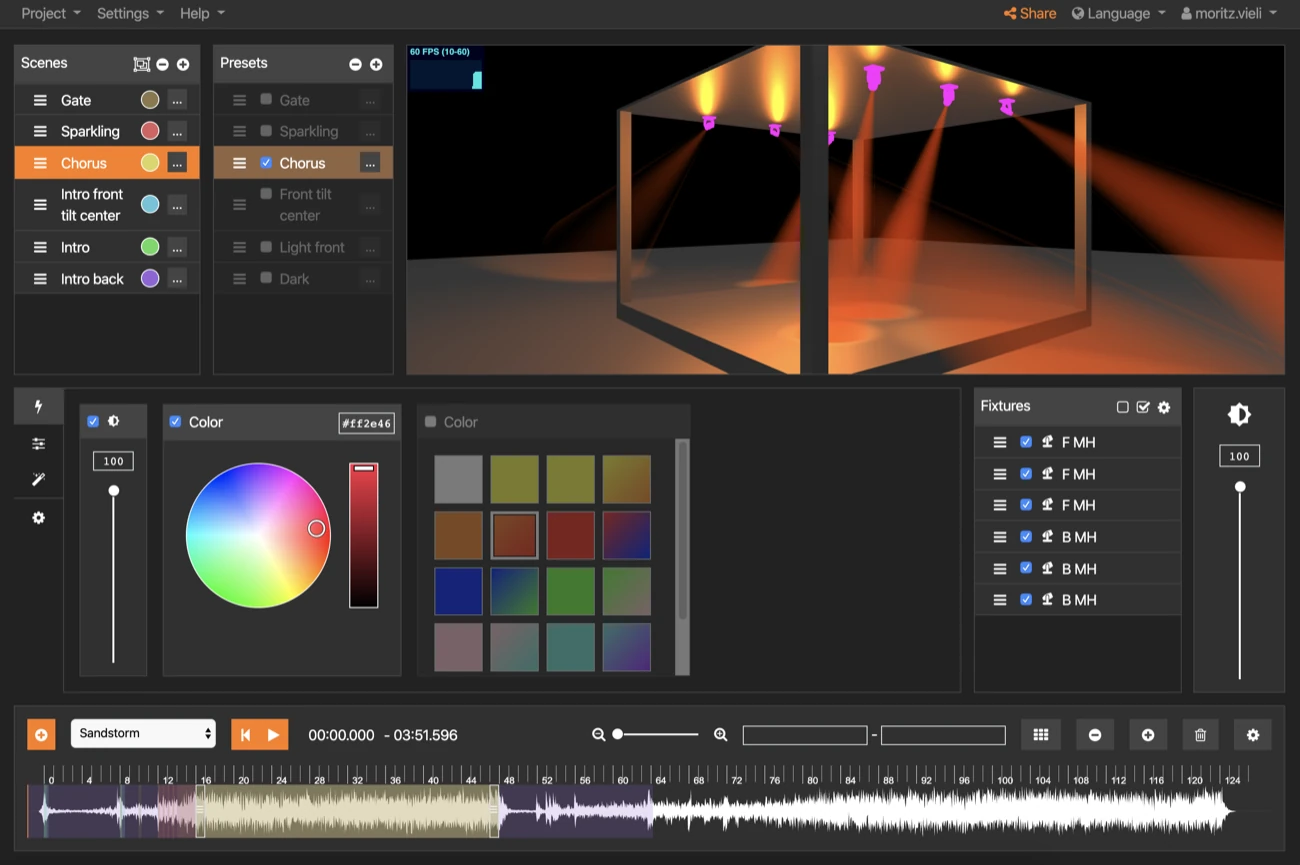
Lay out audio, video and lighting on one timeline, then drop in timed actions: switch an output pin at 4.2 s, send a MIDI command at 9.0 s.

02

Wire the triggers

Buttons and sensors go to the two digital inputs; props, locks and effects hang off the four outputs through a relay board. Three terminal blocks come in the box.

03

Leave it running

Set a default composition and it plays on power-up. Reset it for the next group, or start the next cycle, from a tablet, a wired button or over the network.

Triggers & I/O

Everything the space can sense — and do.

SPARK sits between what your visitors do and what happens next.

What starts a scene

Buttons & sensors
Two digital inputs read a 3.3 V signal: a push button, a reed switch on a drawer, a beam break, or a dry contact from an existing controller. Terminal blocks included.
Your control system
A PLC, relay board, building controller or game-master software can trigger SPARK over the digital inputs, MIDI In or the network.
A phone or tablet
Start, stop and reset from any browser on the venue network — the game master's tablet, the front desk PC, or a phone in someone's pocket. Nothing to install.
Power-on
A default composition plays automatically as soon as the unit boots, so everything comes back on its own after a power cut.
A schedule, or another unit
Run to a timetable, or let one SPARK trigger the next over LAN or MIDI.

What a scene drives

Props, locks & effects
Four digital outputs switch on cue. They are 3.3 V logic signals, so maglocks, smoke, fans and motors run through a relay or optocoupler board.
Lighting
Full scenes over DMX512 or Art-Net: the reveal, the blackout, the slow build as someone approaches — on the same timeline as the sound.
Sound
Two independent stereo outputs — four channels — so one unit can feed separate zones, or keep ambience and voice-over apart.
Video
HDMI up to 4K to a screen, projector or hidden monitor, frame-locked to the audio.
MIDI & show gear
Notes, program changes and control messages out to anything MIDI-controlled on site.

The digital pins are 3.3 V logic at up to 8 mA — signal level, not power. Anything drawing real current (maglocks, solenoids, mains devices) belongs behind a relay or optocoupler board; wiring it directly can damage the unit and whatever is on the other end.

The hardware

Goes in the cupboard. Stays out of the way.

Professional connectivity in a compact unit built to sit in the rack, do its job and never ask for attention.

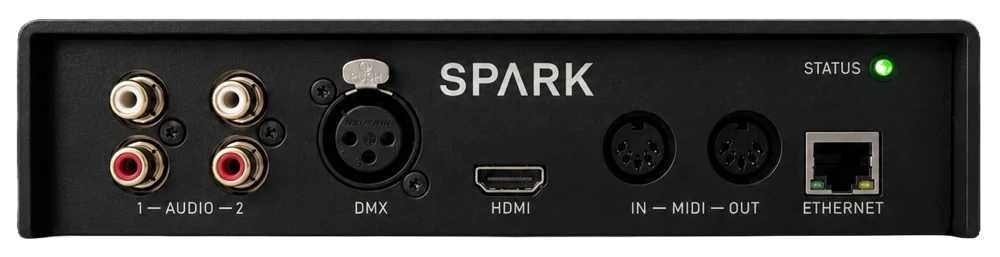
Front panel of the Rocket Show SPARK unit
Front
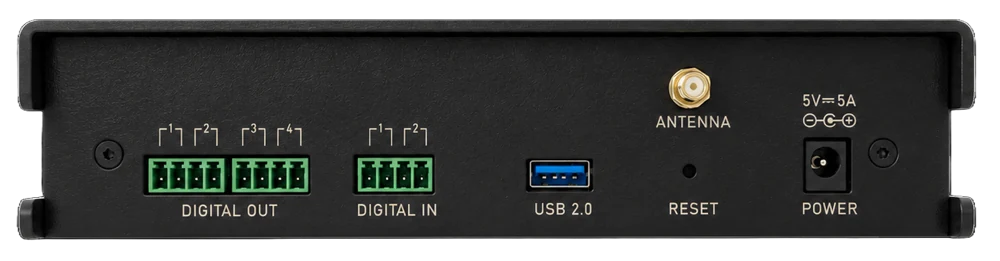
Back panel of the Rocket Show SPARK unit with ports
Back

Drops straight into the build

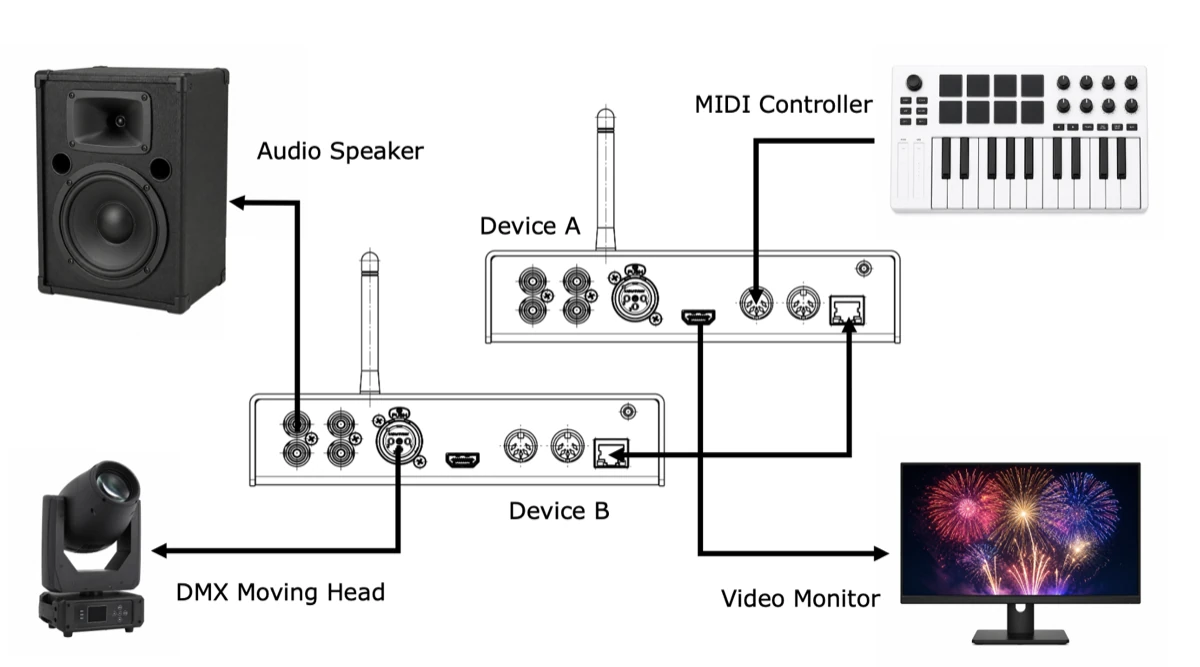
Sensors and buttons in on the digital inputs, props and effects out through a relay board, DMX or Art-Net to the fixtures, HDMI up to 4K to the screens, and audio to the speakers. More than one space? Give each its own unit and chain them over the network.

  • 2 × digital inputs for buttons & sensors
  • 4 × digital outputs for props & effects
  • DMX & Art-Net lighting output
  • Audio zones, 4K video & MIDI
Wiring diagram showing SPARK connected to lights, screens, audio and MIDI
Technical features

Everything an installation needs, on one box.

Sensor inputs

Two digital inputs read buttons, reed switches and contact closures from anywhere in the build.

Prop outputs

Four digital outputs fire at exact moments in the timeline — via a relay board for anything with real current.

Lighting

Design scenes in the open-source designer and run them over DMX or Art-Net.

Video & sound

Up to 4K over HDMI, and two independent stereo outs for separate audio zones — all frame-locked together.

Auto-start

A default composition plays on power-up, so everything comes back by itself after a cut — nobody has to log in.

Scales across the site

Give every unit its own name on the network and chain as many as you like over LAN or MIDI — one can trigger the next.

Technical specifications

The full sheet, nothing hidden.

Everything you need to plan the wiring before a single cable goes into the wall.

Inputs & outputs

Digital I/O
4 × outputs, 2 × inputs · 3.3 V, ≤ 8 mA per pin · terminal blocks included
Lighting
DMX512 output (3-pin) · Art-Net over Ethernet · multiple universes
Audio
2 × independent stereo outputs (4 channels total), usable as separate mono outputs
Video
HDMI output, up to 4K
MIDI
MIDI In and MIDI Out
USB
USB 2.0 high speed — for extra audio/MIDI interfaces or peripherals

System & network

Computing unit
Broadcom BCM2712 quad-core 64-bit Arm Cortex-A76 @ 2.4 GHz · 2 GB RAM
Storage
64 GB — around 49 GB free for your shows
Audio quality
16-bit / 48 kHz · SNR 98 dB typ. · dynamic range 98 dB typ.
Network
Ethernet · Wi-Fi 2.4 & 5 GHz (802.11 b/g/n/ac), antenna included
Dimensions
20.1 × 14.8 × 4.7 cm (L × W × H)
Power
5 V DC, up to 25 W under full load · power supply included
In the box
SPARK unit · power supply with adapter · Wi-Fi antenna · 3 × terminal blocks · printed Quick Start Guide

Indoor use · 2-year warranty · Full details in the Quick Start Guide.

Trusted by creators

Installations that have run for years.

“We've had several light and music installations running on Rocket Show SPARK for over 5 years — among them the famous Zauberwald in Lenzerheide.”
R. Wilhelm Head Smashed
“Setup was faster than I expected, and the support is outstanding. Worth every euro.”
Chris Bluemoon Virus of the Cactus
“Our backing tracks used to run off a drum pad. Today one button press starts the whole set: click, samples and lights, perfectly together every night. And no risk of a laptop overheating!”
Adrian Gisler Arcaine

Open source on GitHub since 2017 — no licence server, no lock-in. Your shows keep running, whatever happens to us.

Everything included · one price

Own it outright for €795

  • Rocket Show SPARK hardware unit
  • Show editor & lighting designer — no licence fees, no per-unit subscription
  • Lifetime software & firmware updates
  • 2-year warranty
  • 30-day money-back guarantee
Buy now — €795

30 days to change your mind. Send it back, no questions asked.

Designed & built in Switzerland

VAT included · + €40 shipping worldwide, less in the EU · Delivery in about 2 weeks

Fitting out a whole site? Ask us about pricing for multiple units.

Before you buy

The questions we get most.

Can a button or a sensor start a scene?
Yes. The two digital inputs take a 3.3 V signal — a push button, a reed switch on a drawer, a beam break as someone walks past, or a relay output from the controller you already use. The terminal blocks you need are in the box.
Can it open a maglock or fire a prop?
It fires the signal that does. The four digital outputs switch 3.3 V at up to 8 mA — logic level, not power. Run them into a relay or optocoupler board, and that board switches the lock, the smoke machine or the motor. Wiring a load straight onto the pins can destroy them.
Does it start on its own after a power cut?
Yes. Assign a default composition and it plays automatically once the unit has booted — about a minute from cold. Nobody has to log in or press anything.
How do we reset or restart it between visitors?
From any browser on the network — a game master's tablet, the front desk PC, or a phone — or from a wired button, a MIDI command, or a signal from the software you already use.
One unit per space, or one for the whole site?
Usually one per space: each keeps running if another is down, and each unit gets its own name on the network. Units can still trigger each other over LAN or MIDI for larger installs. Because networked units exchange control instructions rather than a shared playback clock, outputs that must stay frame-accurate to each other belong on the same unit.
Does it need an internet connection?
No. Everything runs locally on the unit, and the software is open source with no licence server to phone home to — the installation keeps working whatever happens to us. You reach the web interface over the venue's Ethernet or the unit's own Wi-Fi access point, which can be switched off entirely, and the connection can be TLS-encrypted.
Can I use it outdoors?
Not on its own: the unit is specified for indoor use — no rain, condensation, dust or direct sunlight. Outdoor installations house it in a suitable weatherproof, ventilated enclosure and keep it inside its temperature and humidity limits.
Does SPARK work with my existing lighting rig?
Yes. SPARK speaks standard DMX512 over its 3-pin output, so it drives the fixtures, dimmers and moving heads you already own — no need to replace anything.
Is Art-Net supported?
Yes. Art-Net runs over the Ethernet port, so you can drive Art-Net nodes and larger rigs across your network alongside — or instead of — the physical DMX output.
What happens if a unit fails mid-show?
SPARK is built to run unattended for years, but no single piece of hardware is immune. For shows that genuinely cannot stop — theatre runs, permanent installations, ticketed events — we recommend keeping a second unit on the shelf as a backup. Your show files copy across in minutes.
How long does shipping take, and what does it cost?
Delivery takes roughly two weeks. Shipping is a €40 flat rate worldwide, and less within the EU.
Are VAT, customs and duties included?
VAT is already included in the €795 price. Any customs duties or import charges in your country are paid by you on delivery, as is normal for international orders.
What if it isn't right for me?
Send it back within 30 days, no questions asked. Open the box and try it properly — we just need everything that came in it returned.
One controller

Spaces that run themselves.

Wherever a space has to perform on its own — visitor after visitor, day after day — SPARK is at home.

Not ready to buy?

Talk to us first.

Tell us about the space, the props and what has to fire when — we'll tell you honestly whether SPARK fits, before you spend anything.

  • Fitting out a single exhibit or a whole site? We do custom pricing on multiple units.
  • Quotes, invoices and purchase orders for institutions — no problem.
  • Answers from the people who build it, usually within one working day.

We only use your details to answer you. No newsletter, no sharing.

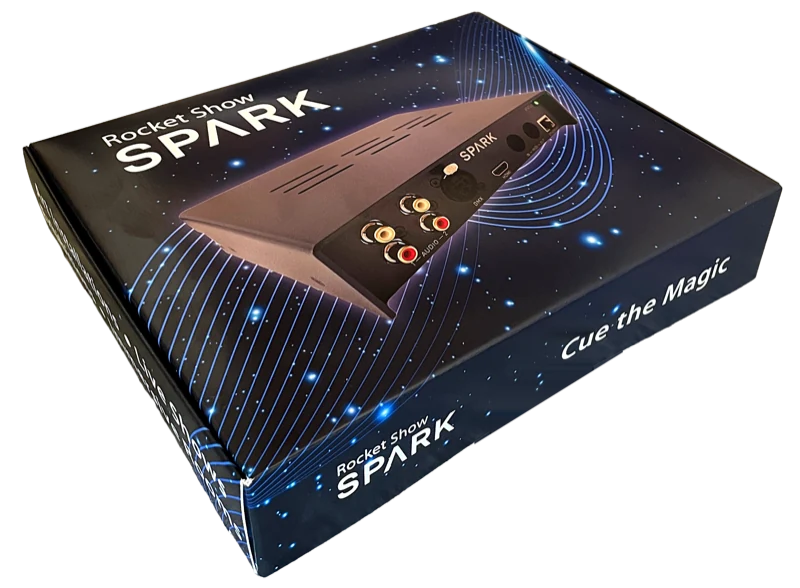
The boxed Rocket Show SPARK as it ships

Get started, risk-free.

Unbox, wire it up and run your first scene in minutes — backed by a 30-day money-back guarantee if it's not for you. Pin assignments, wiring diagram and safety limits are all in the Quick Start Guide.

Download Quick Start Guide (PDF)

Wire it once.
Let SPARK take it from there.

Reliable, synchronized playback — every visitor, every day, for years.

Buy now — €795

30-day money-back guarantee — no questions asked
Not sure yet? Ask us about your setup →